Stop using one AI model to do everything.
I configured OpenCode with 3 specialized agents that work together, and my code quality went up dramatically. The secret? Each agent has a specific role, optimized temperature, and restricted tool access.
This is the exact configuration I use daily, and here’s how to set it up yourself.
Why Multi-Agent Beats Single-Model
Most developers use one LLM for everything: writing code, debugging, researching APIs, reviewing changes. The problem? No single model excels at all tasks.
Claude Opus 4 dominates coding benchmarks (72.5% on SWE-bench) but costs more and can be overkill for simple lookups.
Perplexity Sonar Pro has real-time web access but shouldn’t touch your files.
GPT models are excellent at structured debugging but may lack Claude’s nuanced code understanding.
The solution: specialized agents that collaborate automatically.
When your primary coder hits a problem, it calls a researcher for documentation. When it writes code, a debugger validates it. Each agent does what it does best.
The 3-Agent Architecture
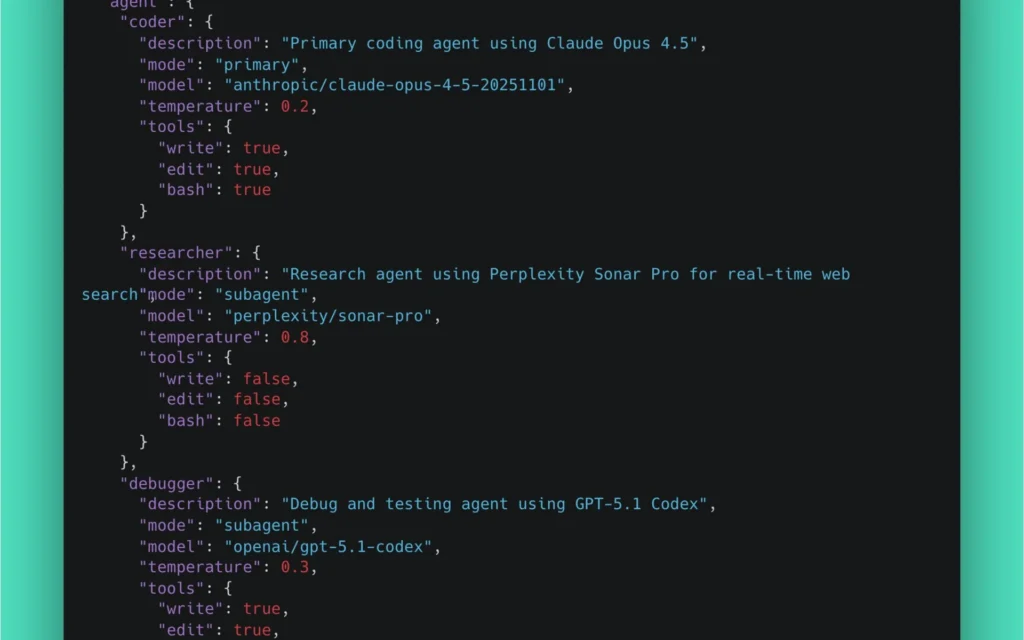
Here’s the complete OpenCode configuration:
{
  "$schema": "https://opencode.ai/config.json",
  "model": "anthropic/claude-opus-4-5-20251101",
  "agent": {
    "coder": {
      "description": "Primary coding agent using Claude Opus 4.5",
      "mode": "primary",
      "model": "anthropic/claude-opus-4-5-20251101",
      "temperature": 0.2,
      "tools": {
        "write": true,
        "edit": true,
        "bash": true
      }
    },
    "researcher": {
      "description": "Research agent using Perplexity Sonar Pro for real-time web search",
      "mode": "subagent",
      "model": "perplexity/sonar-pro",
      "temperature": 0.8,
      "tools": {
        "write": false,
        "edit": false,
        "bash": false
      }
    },
    "debugger": {
      "description": "Debug and testing agent using GPT-5.1 Codex",
      "mode": "subagent",
      "model": "openai/gpt-5.1-codex",
      "temperature": 0.3,
      "tools": {
        "write": true,
        "edit": true,
        "bash": true
      }
    }
  }
}
Let’s break down why each setting matters.
Agent 1: The Coder (Claude Opus 4.5)
Role: Primary development agent
Model: anthropic/claude-opus-4-5-20251101
Temperature: 0.2 (precise)
Tools: Full access (write, edit, bash)
Why Claude Opus for Coding?
Claude Opus 4 is the world’s best coding model, period. On SWE-bench Verified (real-world software engineering tasks), it scores 72.5% – dramatically outperforming GPT-4.1 (54.6%) and Gemini 2.5 Pro (63.2%).
More importantly, Opus excels at:
- Multi-file refactoring: Understands relationships across large codebases
- Long-running tasks: Can work continuously for hours on complex implementations
- Agentic workflows: Superior at breaking down tasks and executing multi-step plans
Why Temperature 0.2?
Temperature controls randomness. For code generation, you want determinism:
- 0.2 (low): Produces consistent, predictable code that follows established patterns
- 0.8 (high): More creative but potentially inconsistent outputs
Research shows that perplexity improves by ~15% for each 0.1 reduction in temperature below 0.7. For code, where correctness matters more than creativity, 0.2 is optimal.
When 0.2 works best:
- Writing functions that follow conventions
- Implementing well-defined algorithms
- Refactoring existing code
- Bug fixes with clear requirements
Why Full Tool Access?
The coder needs to:
- Write: Create new files
- Edit: Modify existing code
- Bash: Run tests, install dependencies, execute scripts
Restricting these would cripple its effectiveness.
Coder Configuration
"coder": {
  "description": "Primary coding agent using Claude Opus 4.5",
  "mode": "primary",
  "model": "anthropic/claude-opus-4-5-20251101",
  "temperature": 0.2,
  "tools": {
    "write": true,
    "edit": true,
    "bash": true
  }
}
Agent 2: The Researcher (Perplexity Sonar Pro)
Role: Real-time documentation and API research
Model: perplexity/sonar-pro
Temperature: 0.8 (creative exploration)
Tools: None (research only)
Why Perplexity for Research?
Perplexity Sonar Pro is built for one thing: real-time web search. Unlike Claude or GPT, it:
- Has live internet access (not stuck at training cutoff)
- Cites sources so you can verify information
- Specializes in finding current documentation, not hallucinating outdated APIs
When you’re implementing a new library, Perplexity returns the actual 2025 docs, not 2023 patterns that no longer work.
Why Temperature 0.8?
Research benefits from creative exploration:
- 0.8 (high): Explores multiple approaches, finds alternative solutions
- 0.2 (low): Would give narrow, potentially incomplete answers
When researching “best way to implement WebSocket reconnection in Python”, you want diverse options – not just the first pattern it finds.
Why No Tool Access?
This is critical: the researcher should never touch your code.
Its job is to:
- Find documentation
- Return API examples
- Explain concepts
If it had write access, it might “helpfully” create files based on research. That’s the coder’s job.
Security principle: Agents with web access should be read-only on your filesystem.
Researcher Configuration
"researcher": {
  "description": "Research agent using Perplexity Sonar Pro for real-time web search",
  "mode": "subagent",
  "model": "perplexity/sonar-pro",
  "temperature": 0.8,
  "tools": {
    "write": false,
    "edit": false,
    "bash": false
  }
}
Agent 3: The Debugger (GPT-5.1 Codex)
Role: Testing, debugging, and validation
Model: openai/gpt-5.1-codex
Temperature: 0.3 (balanced)
Tools: Full access (to run tests and apply fixes)
Why GPT for Debugging?
GPT models excel at structured analysis:
- Methodical step-by-step debugging
- Clear error message interpretation
- Systematic test case generation
While Claude writes better code, GPT is often better at finding what’s wrong with existing code. It’s more literal and less likely to “improve” things when you just want it to fix a bug.
Why Temperature 0.3?
Debugging needs a balance:
- Too low (0.1): Might miss creative solutions to tricky bugs
- Too high (0.7+): Could suggest risky “fixes” that introduce new issues
At 0.3, the debugger is:
- Mostly deterministic (follows logical debugging steps)
- Slightly flexible (can try alternative approaches if needed)
Why Full Tool Access?
The debugger needs to:
- Run tests (bash) to reproduce issues
- Edit files to apply fixes
- Write test files for validation
Without these, it can only suggest fixes. With them, it can verify its solutions actually work.
Debugger Configuration
"debugger": {
  "description": "Debug and testing agent using GPT-5.1 Codex",
  "mode": "subagent",
  "model": "openai/gpt-5.1-codex",
  "temperature": 0.3,
  "tools": {
    "write": true,
    "edit": true,
    "bash": true
  }
}
How They Collaborate
The magic happens through automatic agent invocation. Here’s the workflow:
Workflow 1: Coder Needs Documentation
You: "Add rate limiting to the API using Redis"

Coder (Claude): I need current Redis rate limiting patterns.
        ↓ [calls researcher subagent]

Researcher (Perplexity): [searches web]
        Returns: Current Redis rate limiting approaches:
        - Token bucket algorithm
        - Sliding window with sorted sets
        - Fixed window with INCR
        [includes 2025 documentation links]
        ↓

Coder (Claude): [uses research to implement]
        Creates: rate_limiter.py with token bucket pattern
Workflow 2: Coder Writes, Debugger Validates
You: "Implement the user authentication flow"

Coder (Claude): [writes auth module]
        Creates: auth/login.py, auth/middleware.py
        ↓ [calls debugger subagent]

Debugger (GPT): [runs tests, checks edge cases]
        Runs: pytest auth/
        Finds: Token expiration not handled correctly
        ↓

Debugger (GPT): [fixes issue]
        Edits: auth/middleware.py (adds expiration check)
        Runs: pytest auth/ (all pass)
        ↓

Returns to Coder: Validation complete, 1 issue fixed
Workflow 3: Research + Code + Debug Pipeline
You: "Implement WebSocket with automatic reconnection"

Coder: @researcher What's the current best practice for
       WebSocket reconnection in Python 2025?
       ↓

Researcher: [returns exponential backoff patterns,
            websockets library docs, connection pooling approaches]
       ↓

Coder: [implements based on research]
       Creates: websocket_client.py
       ↓

Coder: @debugger Validate this WebSocket implementation
       ↓

Debugger: [runs tests, simulates disconnections]
       Finds: Reconnection doesn't restore subscriptions
       Fixes: Adds subscription restoration in reconnect handler
       ↓

Final: Battle-tested WebSocket implementation
Manual Agent Invocation
You can also call agents directly using @ mentions:
# Direct research request
@researcher What are the latest changes in React 19 for Server Components?

# Direct debugging request
@debugger The tests in auth/ are failing, investigate and fix

# Switch between primary agents (Tab key)
[Tab] switches from coder to plan agent
Setting Up OpenCode
Installation
curl -fsSL https://opencode.ai/install | bashConfiguration File Location
Create your config at one of these locations:
# Project-specific (recommended)
.opencode/opencode.json

# Global
~/.config/opencode/opencode.json
Complete Configuration
Here’s the full opencode.json:
{
  "$schema": "https://opencode.ai/config.json",
  "model": "anthropic/claude-opus-4-5-20251101",
  "agent": {
    "coder": {
      "description": "Primary coding agent using Claude Opus 4.5",
      "mode": "primary",
      "model": "anthropic/claude-opus-4-5-20251101",
      "temperature": 0.2,
      "tools": {
        "write": true,
        "edit": true,
        "bash": true
      }
    },
    "researcher": {
      "description": "Research agent using Perplexity Sonar Pro for real-time web search",
      "mode": "subagent",
      "model": "perplexity/sonar-pro",
      "temperature": 0.8,
      "tools": {
        "write": false,
        "edit": false,
        "bash": false
      }
    },
    "debugger": {
      "description": "Debug and testing agent using GPT-5.1 Codex",
      "mode": "subagent",
      "model": "openai/gpt-5.1-codex",
      "temperature": 0.3,
      "tools": {
        "write": true,
        "edit": true,
        "bash": true
      }
    }
  }
}
API Keys Setup
Set environment variables:
# ~/.zshrc or ~/.bashrc
export ANTHROPIC_API_KEY="your-anthropic-key"
export PERPLEXITY_API_KEY="your-perplexity-key"
export OPENAI_API_KEY="your-openai-key"
Or create a .env file in your project:
ANTHROPIC_API_KEY=sk-ant-...
PERPLEXITY_API_KEY=pplx-...
OPENAI_API_KEY=sk-...
Verify Setup
opencode

# Then run
/models    # Should show all configured models
/agents    # Should show coder, researcher, debugger
Alternative Agent Configurations
Budget-Conscious Setup
If cost is a concern, use smaller models:
{
  "agent": {
    "coder": {
      "model": "anthropic/claude-sonnet-4-20251101",
      "temperature": 0.2,
      "mode": "primary",
      "tools": { "write": true, "edit": true, "bash": true }
    },
    "researcher": {
      "model": "perplexity/sonar",
      "temperature": 0.8,
      "mode": "subagent",
      "tools": { "write": false, "edit": false, "bash": false }
    },
    "debugger": {
      "model": "openai/gpt-4o-mini",
      "temperature": 0.3,
      "mode": "subagent",
      "tools": { "write": true, "edit": true, "bash": true }
    }
  }
}
Cost comparison (approximate):
- Opus setup: ~$15/1M tokens (combined)
- Sonnet setup: ~$3/1M tokens (combined)
Local Models Setup
For privacy or offline work:
{
  "agent": {
    "coder": {
      "model": "ollama/deepseek-coder-v2",
      "temperature": 0.2,
      "mode": "primary",
      "tools": { "write": true, "edit": true, "bash": true }
    },
    "reviewer": {
      "model": "ollama/codellama",
      "temperature": 0.1,
      "mode": "subagent",
      "description": "Code review agent",
      "tools": { "write": false, "edit": false, "bash": false }
    }
  }
}
Adding a Code Reviewer
For teams that want pre-commit review:
"reviewer": {
  "description": "Code review agent - checks for bugs, security issues, and best practices",
  "mode": "subagent",
  "model": "anthropic/claude-sonnet-4-20251101",
  "temperature": 0.1,
  "tools": {
    "write": false,
    "edit": false,
    "bash": false
  }
}
Usage:
@reviewer Review my changes before I commitBest Practices
1. Match Temperature to Task
| Task Type | Temperature | Reasoning |
|---|---|---|
| Code generation | 0.1-0.3 | Deterministic, follows patterns |
| Debugging | 0.2-0.4 | Methodical with slight flexibility |
| Research | 0.7-0.9 | Explores diverse options |
| Creative writing | 0.8-1.0 | Maximum diversity |
2. Restrict Tools by Role
Principle of least privilege:
- Research agents: No file access
- Review agents: Read-only
- Implementation agents: Full access
3. Use Descriptive Agent Names
Good:
"security-auditor": { "description": "Reviews code for security vulnerabilities" }
"api-documenter": { "description": "Generates OpenAPI specs from code" }
Bad:
"agent1": { "description": "Does stuff" }4. Create Project-Specific Agents
Put specialized agents in .opencode/agent/:
.opencode/
├── agent/
│   ├── django-expert.md
│   ├── typescript-migrator.md
│   └── test-writer.md
└── opencode.json
5. Test Agent Collaboration
Before relying on auto-invocation, manually test:
@researcher [your typical research question]
@debugger [your typical debug scenario]
Ensure each agent returns useful results.
Common Issues
Agent Not Found
Problem: @researcher not recognized
Fix: Check configuration is in correct location:
# Should be one of:
.opencode/opencode.json
~/.config/opencode/opencode.json
Wrong Model Invoked
Problem: Subagent uses wrong model
Fix: Ensure model field is correct:
"researcher": {
  "model": "perplexity/sonar-pro",  // Not just "perplexity"
  ...
}
Subagent Can’t Access Files
Problem: Debugger says “I don’t have file access”
Fix: Check tools configuration:
"tools": {
  "write": true,   // Must be true
  "edit": true,    // Must be true
  "bash": true     // Must be true
}
API Rate Limits
Problem: Agent fails with rate limit error
Fix: Add delays between heavy operations, or use different providers for different agents to spread load.
Why This Works
The multi-agent approach works because it mirrors how expert teams function:
- Specialists outperform generalists at focused tasks
- Separation of concerns prevents one agent from doing everything poorly
- Automatic collaboration removes friction from switching tools
- Optimized settings (temperature, tools) maximize each agent’s strengths
The result: code that’s written by the best coding model, researched with live documentation, and validated by a dedicated debugger.
Key Takeaways
-
Use Claude Opus for writing code – It’s the best coding model available (72.5% SWE-bench)
-
Use Perplexity for research – Real-time web access beats training data cutoffs
-
Use GPT for debugging – Methodical, structured analysis
-
Match temperature to task – 0.2 for code, 0.3 for debugging, 0.8 for research
-
Restrict tool access by role – Researchers shouldn’t touch files
-
Let agents collaborate automatically – The magic is in the handoffs
This setup has transformed my workflow. Instead of one overwhelmed model trying to be everything, I have three specialists doing what they do best.
Try it yourself. The productivity gains are real.
Frequently Asked Questions
Is OpenCode the same as Claude Code?
No. OpenCode is an open-source CLI that supports many providers and models. Claude Code is Anthropic’s official CLI tied to Claude. OpenCode is more flexible; Claude Code has tighter Anthropic integration.
Why use multiple agents instead of one?
Different tasks need different model strengths. Claude Opus is best at long, careful coding; Perplexity is best at fresh research; GPT is best at quick reviews. Splitting the work lets each agent do what it does best.
How do agents share context?
Through a shared workspace and explicit handoffs. The plan agent writes a plan; the coder reads it, edits files, and signals when done; the debugger agent runs tests. Each agent sees only what it needs.
Is this overkill for solo developers?
For small projects, yes. For larger codebases or when you want quality + speed, the setup pays off. Most developers start with one agent and add specialists when they hit a bottleneck.
Can I use this with local models?
Yes. OpenCode supports Ollama out of the box. Pair Qwen 2.5 Coder for the coder role with a smaller model for plan and debug to run fully offline.