Ever watched an AI coding assistant grep through your codebase looking for function references? Hundreds of matches scroll by, including comments, string literals, and similarly-named variables. Somewhere in that noise are the actual usages you care about. There’s a better way.
The Language Server Protocol (LSP) transforms how AI tools understand your code. Instead of pattern matching through text files, LSP provides semantic understanding, the same intelligence that powers “Go to Definition” in VS Code. This article explains what LSP is, how it works with AI coding tools like Claude Code, and how professionals use it to write better code faster.
What is LSP?
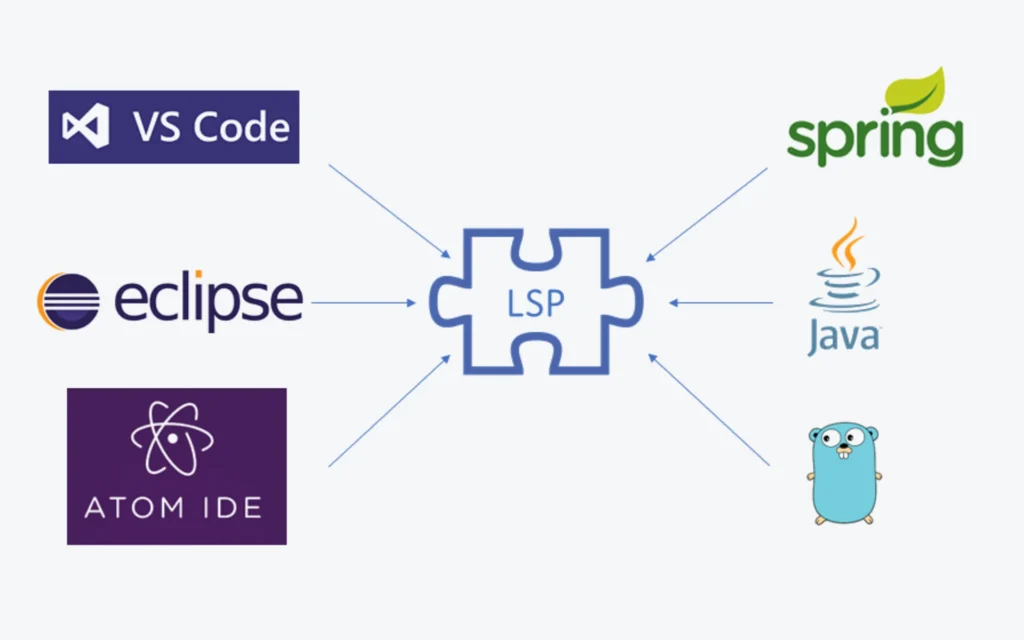
Microsoft created the Language Server Protocol in 2016 to solve a multiplication problem. Before LSP, providing language support for M languages in N editors required M×N implementations. Want Python support in VS Code, Vim, Sublime Text, and Emacs? That’s four separate plugins. Add JavaScript, Go, Rust, and TypeScript, and you’re looking at 20 implementations, each with different capabilities and bugs.
LSP changes this to an M+N problem. Build one language server for Python, and it works with every LSP-compatible editor. Build one LSP client for your editor, and it works with every language server.
The protocol standardizes how development tools communicate with language servers using JSON-RPC messages. When you open a file, your editor sends a textDocument/didOpen notification. When you type, it sends textDocument/didChange. The language server analyzes the code and responds with diagnostics, completions, and navigation data.
Core LSP Operations
Language servers provide these capabilities:
Go to Definition jumps to where a symbol is defined. Click on a function call, and you land on its implementation. The request includes the document URI and cursor position, the server returns the exact file and line number.
Find References locates every place a symbol is used. Renaming a function? You need to know everywhere it’s called. LSP returns precise locations, not just text matches.
Hover displays type information and documentation. Hover over a variable, and you see its type, inferred value, or JSDoc comments.
Document Symbols lists all functions, classes, and variables in a file. This powers outline views and quick navigation.
Diagnostics reports errors and warnings in real-time. The server continuously analyzes your code and publishes issues as you type.
Workspace Symbol searches for symbols across your entire project. Find that UserService class without knowing which file contains it.
LSP vs Text Search: The Performance Gap
The difference is dramatic. Finding all call sites of a function takes approximately 50ms with LSP compared to 45 seconds with traditional text search. That’s a 900x improvement.
But speed isn’t the main benefit. Text search returns false positives constantly:
- Comments mentioning the function name
- String literals containing the name
- Similarly-named variables in different scopes
- Documentation references
LSP understands scope, types, and relationships. It distinguishes between process the function, process the variable, and “process” in a comment. In a 100-file project, grep-based reference finding might consume 2000+ tokens scanning output. LSP returns exact matches in around 500 tokens.
Think of it like the difference between searching a library by reading every book versus using the card catalog.
LSP in AI Coding Tools
AI coding assistants like Claude Code, OpenCode, Cursor, and Windsurf use LSP to write better code. Here’s what that looks like in practice.
Setting Up LSP with Claude Code
Anthropic shipped native LSP support for Claude Code in December 2025 (version 2.0.74). The integration provides automatic diagnostics after every file edit, semantic code navigation, and type-aware understanding.
Step 1: Enable LSP in Claude Code
Add this to your Claude Code settings file (~/.claude/settings.json):
{
  "env": {
    "ENABLE_LSP_TOOL": "1"
  }
}
Or run Claude Code with the environment variable:
ENABLE_LSP_TOOL=1 claudeStep 2: Install Language Server Binaries
Install the language servers for your tech stack:
TypeScript/JavaScript:
npm install -g typescript-language-server typescriptPython:
pip install pyrightGo:
go install golang.org/x/tools/gopls@latestRust:
rustup component add rust-analyzerJava: Download Eclipse JDT Language Server from GitHub.
C/C++:
# Install clangd (comes with LLVM)
brew install llvm  # macOS
apt install clangd # Ubuntu/Debian
Step 3: Install Claude Code LSP Plugins
Open Claude Code and run:
/plugin install typescript-lsp
/plugin install pyright-lsp
/plugin install rust-lsp
Or install from the marketplace. Search for “lsp” in the /plugin Discover tab.
Step 4: Verify Setup
After installation, Claude Code gains these capabilities:
- goToDefinition: Jump to where symbols are defined
- findReferences: Find all usages of a function or variable
- hover: See type information and documentation
- getDiagnostics: Real-time error and warning detection
Run /lsp-tools:lsp-setup in your project to verify everything works.
Setting Up LSP with OpenCode
OpenCode includes 30+ pre-configured language servers that auto-install when you open matching file types. Setup is simpler because most servers work out of the box.
Automatic Setup (Default)
OpenCode automatically detects your project files and starts the appropriate language server. Open a .ts file, and the TypeScript server starts. Open a .py file, and Pyright initializes.
Supported languages include: TypeScript, JavaScript, Python, Go, Rust, Ruby, C/C++, C#, Java, Kotlin, Elixir, Vue, Svelte, Astro, PHP, Lua, Zig, Nix, Gleam, Haskell, OCaml, and Clojure.
Custom Configuration
For custom setups, edit your opencode.json file:
{
  "lsp": {
    "typescript": {
      "disabled": false,
      "command": ["typescript-language-server", "--stdio"]
    },
    "python": {
      "disabled": false,
      "command": ["pyright-langserver", "--stdio"]
    },
    "go": {
      "disabled": false,
      "command": ["gopls", "serve"]
    },
    "rust": {
      "disabled": false,
      "command": ["rust-analyzer"]
    }
  }
}
Disable Auto-Installation
If you want to manage language servers manually, set this environment variable:
export OPENCODE_DISABLE_LSP_DOWNLOAD=1Environment Variables for Specific Servers
Some servers need environment configuration:
{
  "lsp": {
    "go": {
      "env": {
        "GOPATH": "/Users/you/go",
        "GOMODCACHE": "/Users/you/go/pkg/mod"
      }
    },
    "rust": {
      "env": {
        "RUST_LOG": "info"
      }
    }
  }
}
Disable LSP Entirely
To turn off all LSP features:
{
  "lsp": false
}
Language Server Installation Reference
Here’s a quick reference for installing popular language servers:
| Language | Server | Install Command |
|---|---|---|
| TypeScript | typescript-language-server | npm install -g typescript-language-server typescript |
| Python | Pyright | pip install pyright or npm install -g pyright |
| Go | gopls | go install golang.org/x/tools/gopls@latest |
| Rust | rust-analyzer | rustup component add rust-analyzer |
| Java | Eclipse JDT LS | Download from GitHub releases |
| C/C++ | clangd | brew install llvm or apt install clangd |
| Ruby | Solargraph | gem install solargraph |
| PHP | Intelephense | npm install -g intelephense |
| Kotlin | kotlin-language-server | Download from GitHub releases |
| C# | OmniSharp | dotnet tool install --global csharp-ls |
Professional Workflows with LSP
Here’s how experienced developers use LSP with AI coding tools:
1. Impact Analysis Before Refactoring
Before renaming or modifying a function, run findReferences to understand the blast radius. Which files depend on this code? What will break if I change the signature? AI tools with LSP integration can analyze impact and suggest safe refactoring strategies.
2. Understanding Unfamiliar Codebases
Joining a new project? Use goToDefinition and findReferences to trace code flow. When an AI assistant suggests changes to unfamiliar code, LSP lets it verify that suggestions fit the existing architecture.
3. Real-time Error Prevention
LSP diagnostics catch errors as they’re introduced. When Claude edits a file, the language server immediately reports type mismatches, undefined variables, and import errors. The AI can fix issues before you ever run the code.
4. Call Hierarchy Analysis
incomingCalls shows what functions call your target. outgoingCalls shows what your function calls. This is invaluable for understanding data flow and debugging.
5. Type-Driven Development
Hover information provides type signatures without leaving your editor. AI tools can verify that generated code matches expected types, reducing runtime errors.
Best Practices
Install language servers for all languages in your project. Mixed-language projects need multiple servers. A TypeScript frontend with a Python backend needs both typescript-language-server and pyright.
Use LSP for semantic operations, grep for text search. Looking for a function definition? Use LSP. Searching for a TODO comment? Use grep. Each tool has its place.
Keep language servers updated. LSP servers are actively maintained. Updates bring performance improvements, better diagnostics, and new language features.
Configure workspace folders correctly. Language servers need to know your project root to resolve imports and understand your build system.
Watch for resource usage. Language servers can consume significant CPU and memory on large projects. Monitor performance and restart servers if they become sluggish.
Common Issues and Solutions
“Executable not found in $PATH”: The language server binary isn’t installed. Run the installation command for your language.
Slow diagnostics: Large projects or complex type inference can slow things down. Consider excluding generated files or node_modules from analysis.
Missing references: The language server might not have indexed your entire project. Wait for initialization to complete or trigger a manual re-index.
Incorrect completions: Check that your project configuration (tsconfig.json, pyproject.toml) is valid. Language servers rely on these files.
The Future of AI-Assisted Coding
LSP represents a shift in how AI coding tools work. Instead of treating code as text, they understand it as structured, typed, interconnected symbols. This semantic understanding enables more accurate suggestions, safer refactoring, and fewer false positives.
The combination of large language models with language server intelligence creates something more powerful than either alone. The AI brings natural language understanding and broad programming knowledge. The LSP brings precise, project-specific code analysis.
For developers using AI coding tools, LSP integration isn’t optional anymore. It’s the difference between an AI that guesses and one that knows.